
The software you already use has AI features, how is what we offer different?
Most of the software you pay for now comes with AI built in. Your email drafts replies, your accounting tool categorizes transactions, your CRM writes follow-ups. So how is what we offer different?
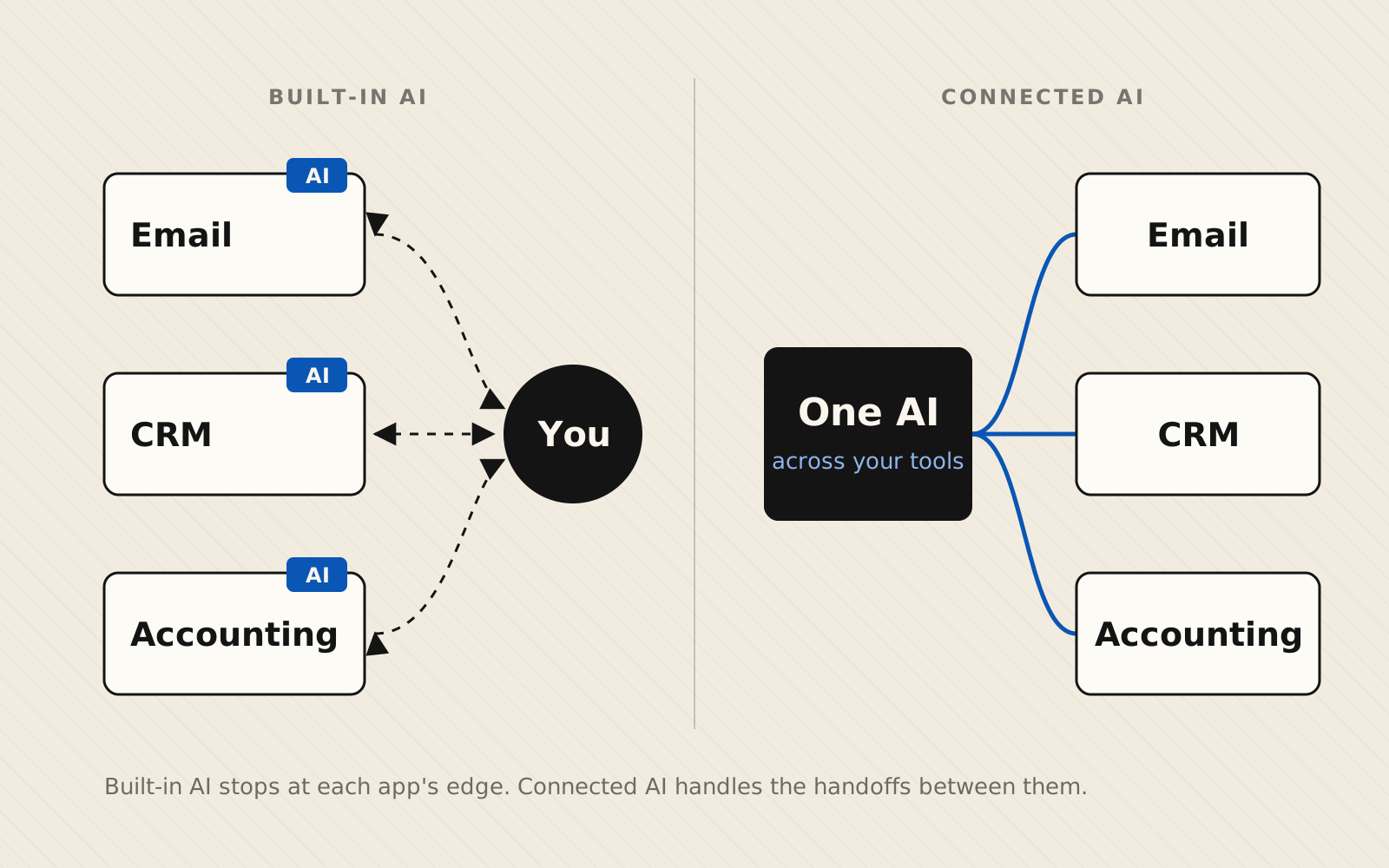
The short answer: each built-in AI feature only works inside the product it is a part of. There is no centralized system tying them together. The work usually doesn't live in one product. It moves from an email to your CRM to an invoice to your calendar, and at every step a person is still copying, checking, and re-typing. The AI speeds up each process, but it doesn't touch the handoffs, and it doesn't know what is going on in the other processes.
This guide is for owners and operators at small and mid-sized businesses who already pay for software with AI built in. It explains why those features fall short and what to do instead. It doesn't review or rank individual products.
What built-in AI features actually do
These features are real and often useful. But read how the vendors describe them, and you'll notice each one is defined by the edges of its own product:
- Microsoft 365 Copilot works within your organization's Microsoft 365 environment. It grounds its answers in the emails, chats, and documents you have permission to see in Microsoft 365, through Microsoft Graph, Microsoft's service for reaching data across its apps (Microsoft Learn).
- QuickBooks added a set of AI agents in July 2025 for accounting, payments, finance, and customer tasks. Intuit describes them as embedded in its own platform, and says they can save businesses up to 12 hours a month (Intuit).
- HubSpot's Breeze agents draw on what's in HubSpot: its CRM records, the emails, calls, and tickets logged there, and your knowledge base and website content (HubSpot).
None of that is a criticism. A vendor can only build AI around the data it holds. But it means every tool you own has its own assistant, and none of them can see the whole job. They aren't customized to understand YOUR data or the overall workflow.
Why built-in AI doesn't add up to real time savings
It stops at the edge of the app
Take a common job: a customer emails asking for a quote. Someone reads the email, looks the customer up in the CRM, checks pricing or past orders in the accounting system, writes the quote, and finds a time to follow up. Your email's AI can draft the reply. Your CRM's AI can summarize the contact. Neither one can pull the price, build the quote, and book the follow-up, because those live somewhere else.
You're still the connection between tools
When each app has its own assistant, you end up carrying answers from one to the next: ask one AI, copy the result, paste it into another app, ask that AI something else. The typing gets faster, but you're still the one moving information around, which is the part that took the time in the first place.
It's built for every customer, not your process
A software vendor designs its AI features for thousands of businesses at once. They handle the common case well. They don't know that your quotes need a site visit first, or that one large customer always pays on different terms. The steps that make your business yours are the steps a generic feature skips.
Having AI isn't the same as using it
Census Bureau survey data shows AI use grew among U.S. firms with at least 20 employees between December 2025 and May 2026, but didn't change significantly among smaller firms (U.S. Census Bureau). For many small businesses, AI is already sitting inside the software they pay for. It just isn't connected to how the work actually gets done.
What connected AI looks like
Connected AI starts from the job, not the app. Instead of one assistant per tool, a single AI is given safe, limited access to each system the job touches, and it handles the handoffs between them.
Back to the quote request. With connected AI, the email arrives and the AI looks the customer up in the CRM, pulls their past orders and current pricing from the accounting system, drafts the quote, and suggests follow-up times from your calendar. A person reviews it and clicks send. The work that used to need four apps and a lot of copying becomes one review step.
What makes this practical now is that connecting AI to business software has become standardized. The Model Context Protocol (MCP) is an open standard for exactly this: each system gets a small connector that describes what the AI may read and do there, and any AI app that supports MCP can use it (Model Context Protocol). We explain it in plain English in What is an MCP server?
Because the connections follow an open standard, you're also not locked to one AI vendor. If a better model comes along next year, you can switch the AI without rebuilding every connection.
Built-in vs. connected AI at a glance
| Built-in AI | Connected AI | |
|---|---|---|
| What it can see | Data inside one product | The data each job needs, across your tools |
| Who moves work between tools | You | The AI, with a person approving key steps |
| Fits your process | Built for every customer of that product | Built around how your business works |
| Which AI it uses | Whatever the software vendor chose | Your choice; not locked to one AI vendor |
| Best for | Tasks that live in one app | Tasks that cross two or more tools |
How to tell which one you need
Built-in features are the right first step for some work. Use this as a quick test for each task that takes up your week:
- The task happens inside one app. Try that app's built-in AI first. Summarizing a document in Word or categorizing transactions in your accounting tool are good examples.
- The task crosses two or more tools. If you re-type the same information into more than one system, or check one app before acting in another, built-in features will only shave seconds. That's where connected AI saves hours.
- The task has your own rules. If it depends on how your business specifically does things, a generic feature will miss those steps. Connected AI can be built around them.
Where to start
- List your repetitive tasks. Write down the jobs your team does every week that feel like busywork.
- Note which tools each one touches. Count the apps, and the times someone copies information from one into another.
- Time them for a week. Rough numbers are fine. You're looking for where the hours actually go.
- Start with the task that crosses the most tools and takes the most time. That's usually your best first project.
This is what our AI Opportunity Assessment does with you. We look at how work moves through your business and find the handoffs where AI will save the most time, then build the connections into the tools you already use and support them as you grow. If we don't find 10+ hours a week or $5,000+ in cost savings, the assessment is free. Book a call.
Frequently asked questions
Should I turn off the AI features in my software?
No. If a built-in feature saves you time inside that app, keep using it. Summarizing a long email thread or categorizing transactions are good uses. The point is to stop expecting those features to fix work that moves between apps, because they weren't built to see it.
Do I need to switch software to get connected AI?
Usually not. Connected AI works with the tools you already run by plugging into them through their APIs (the interfaces software publishes so other programs can work with it) or open standards like MCP. Replacing a system only makes sense when it can't be connected at all, and that's less common than it used to be.
Is it safe to let AI work across my systems?
It can be, if it's set up with limits. A good setup gives the AI access only to what each task needs, keeps a record of what it does, and requires a person to approve anything that sends money, changes records in bulk, or goes out to a customer.
Sources
How we write and correct articles
- Microsoft Learn — How does Microsoft Copilot work? (updated Sep 2026)
- Intuit — Virtual team of AI agents in QuickBooks (Jul 2025)
- HubSpot — Spotlight deep dive: Breeze agents (Apr 2025)
- U.S. Census Bureau — Large Firms With at Least 20 Employees Biggest AI Users (May 2026)
- Model Context Protocol — Architecture overview