
What is an MCP server?
AI assistants are good at reasoning and writing, but on their own they can't see your customer list, check an order, or update a record. MCP servers are how they get that access, safely and in a standard way.
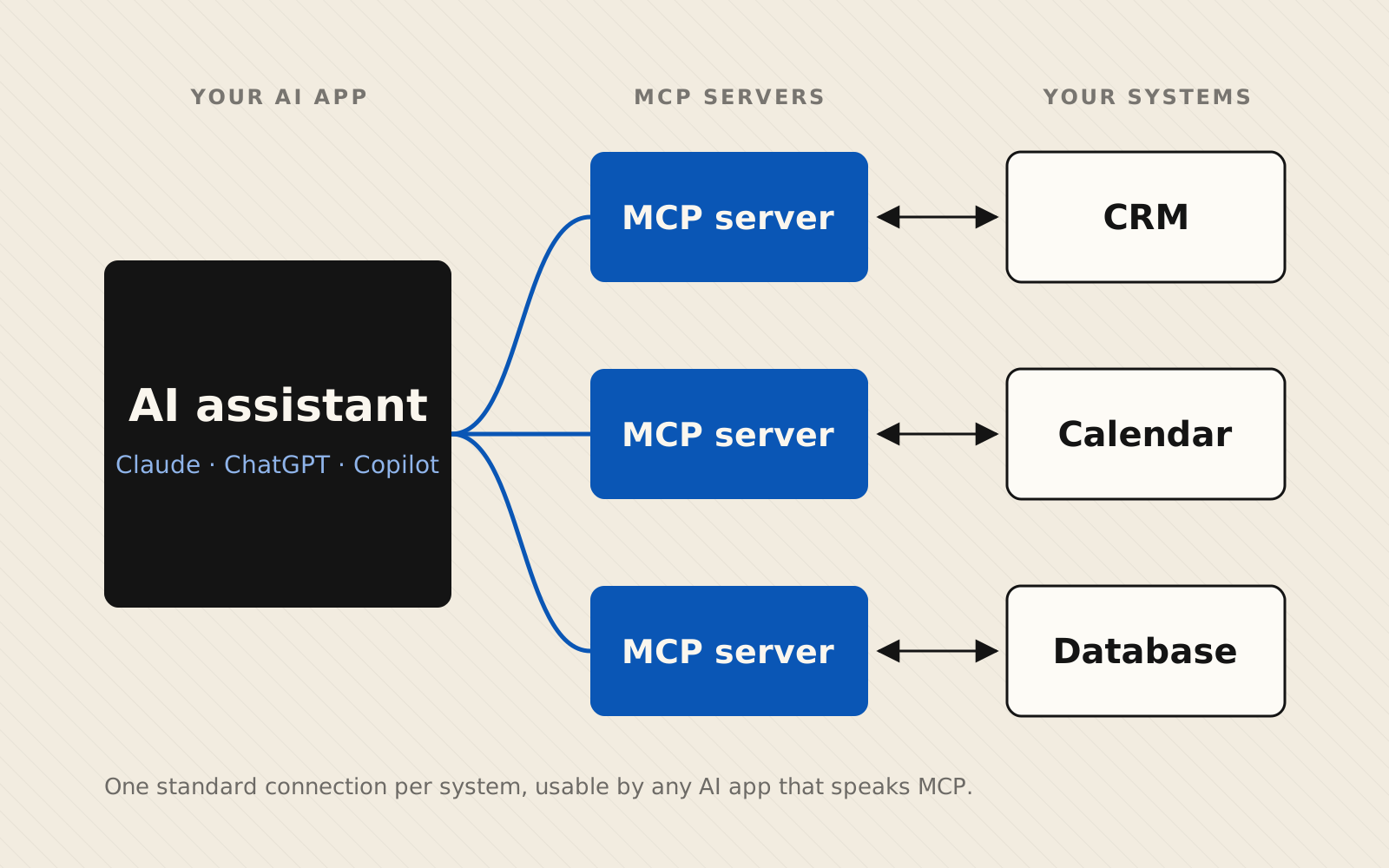
What an MCP server is
MCP stands for Model Context Protocol. It's an open standard, introduced by Anthropic in November 2024, for connecting AI assistants to “the systems where data lives, including content repositories, business tools, and development environments” (Anthropic).
An MCP server is a small program that sits in front of one of those systems (your CRM, your scheduling tool, a database, a shared drive) and describes what an AI is allowed to do with it. Think of it as a universal adapter: build the connection once, and any AI app that speaks MCP can use it.
A server can offer an AI three kinds of things:
- Tools: actions the AI can take, like “look up an invoice” or “create a calendar event.”
- Resources: information the AI can read, like file contents, database records, or a product catalog. Many businesses point that access at a company brain, one organized place for their documents and data.
- Prompts: reusable templates that guide the AI through a specific task.
On the other side is the host, the AI app your team actually uses, such as Claude, ChatGPT, or Microsoft Copilot. The host connects to one or more servers, finds out what each one offers, and calls on them as needed during a conversation (MCP documentation). Servers can run locally on one computer, or remotely as a hosted service many people connect to. That's different from the AI built into tools like Copilot, which only sees inside its own product.
Why it matters: before MCP, every AI tool needed its own custom integration for every system. MCP makes that connection reusable, so you aren't locked into one AI vendor.
It has caught on quickly. In December 2025 Anthropic donated MCP to the Linux Foundation's new Agentic AI Foundation so it would be governed neutrally. By then there were more than 10,000 published MCP servers, and the protocol was supported by Claude, ChatGPT, Gemini, Microsoft Copilot, Cursor, and VS Code (Linux Foundation).
How MCP servers are being used today
Companies across very different industries are publishing MCP servers so AI can work directly with their products. A few examples:
Payments: Stripe
Stripe runs a hosted MCP server that lets AI assistants work with a Stripe account: searching customers, creating invoices and payment links, managing subscriptions, and issuing refunds. For riskier actions like refunds and outbound payments, Stripe requires a person to approve the request before it goes through (Stripe docs).
Healthcare: Infinitus and CharmHealth
Infinitus launched an MCP server in September 2025 so AI agents can automate time-sensitive insurance work: benefit verification, prior authorization, and appeals follow-up (Infinitus). In February 2026, electronic health record provider CharmHealth released one that gives AI tools structured access to patient records, to summarize patient histories, support clinical documentation, handle scheduling, and flag drug interactions and allergies at the point of care (CharmHealth).
Retail: Topsort
Retail media company Topsort launched an MCP server in March 2026. Instead of digging through dashboards, a team can ask an AI “why is this campaign underdelivering this week?” and get an answer from live data on spend, return on ad spend, and clicks. The AI can also help adjust budgets, pause campaigns, or update bids (Topsort).
Software: Sentry
Error-monitoring platform Sentry runs a remote MCP server, so developers can pull issue and error details into AI coding tools like VS Code while they fix bugs (Sentry docs, MCP documentation).
The pattern is the same in each case: the business keeps its existing system, and the MCP server becomes a controlled doorway that lets AI read from it and act on it.
How MCP servers are created
Building an MCP server is ordinary software work, and the official SDKs handle most of the protocol for you. They're available in Python, TypeScript, Java, Kotlin, C#, Ruby, Rust, and Go (MCP build guide). The steps look like this:
- Decide what to expose. List the specific actions and data the AI needs, and nothing more.
- Define each tool. Give it a clear name, a plain-English description of when to use it, and the inputs it expects. The AI relies on these descriptions to pick the right tool.
- Connect it to your system. Each tool calls your existing software's API or database behind the scenes.
- Choose how it runs. Run it locally for a single user, or host it remotely so your whole team can connect. Remote servers typically sign users in with OAuth, the same kind of “Sign in with…” flow used across the web.
- Test and connect. Try the tools with the MCP Inspector developer tool, then add the server to the AI apps your team uses.
Here's what a minimal server looks like with the official Python SDK. It exposes a single tool that looks up an order:
from mcp.server import MCPServer

mcp = MCPServer("orders")

@mcp.tool()
async def get_order_status(order_id: str) -> str:
    """Look up the current status of a customer order.

    Args:
        order_id: The order number, e.g. A-10423
    """
    order = await orders_db.find(order_id)  # your existing system
    return f"Order {order_id} is {order.status}"

if __name__ == "__main__":
    mcp.run(transport="stdio")
The code is the easy part. Most of the real work is deciding what the AI should be allowed to do, and adding guardrails: least-privilege access, human approval for anything that moves money or changes records, and logs of every action. Stripe's approval step for refunds is a good example.
How you can set up an MCP server for your business
You don't need to be a software company to benefit. A practical path looks like this:
- Start with one workflow. Pick a repetitive task that eats hours every week, like answering “where's my order?” emails, preparing weekly reports, or scheduling.
- Check what already exists. Many tools you already pay for, like Stripe, publish their own MCP servers. You may be able to connect those instead of building from scratch.
- Build for the gaps. A custom server connects AI to the systems only your business has, such as an internal database, a legacy tool, or your own processes.
- Set the guardrails. Decide what the AI can read, what it can change, and what needs a person's sign-off.
- Roll out and measure. Start with a small group, track the time saved, and expand from there.
This is exactly what Blue Vista AI does. Our AI Opportunity Assessment finds the workflows where an MCP server will pay off. We then build and host it with the right guardrails, and support it as your business grows. The assessment is free. Book a call.
Sources
- Anthropic — Introducing the Model Context Protocol (Nov 2024)
- Linux Foundation — Formation of the Agentic AI Foundation (Dec 2025)
- Model Context Protocol — Architecture overview
- Model Context Protocol — Build an MCP server
- Stripe — Model Context Protocol (MCP) docs
- Infinitus — MCP server launch (Sep 2025)
- CharmHealth — MCP server launch (Feb 2026)
- Topsort — MCP server launch (Mar 2026)
- Sentry — Sentry MCP server docs